Fix Broken Korean MP3 Tags in One Drag
Old Korean MP3s store artist and title in CP949 but label them as Latin-1, so Telegram and modern players show gibberish. Drop the files onto getMp3 and their ID3 tags are rewritten as proper Unicode — audio untouched, nothing to install.
- Drag & Drop Files or Folders
- CP949 / EUC-KR → Unicode
- ID3v2.3 → UTF-16
- ID3v2.4 → UTF-8
- Audio & Album Art Untouched
- Timestamps Preserved
- No C Runtime, No Installer
Same file, same audio — only the ID3 tag encoding changes.
 getMp3
It’s Not the Filename. It’s the Tag.
Renaming the file does nothing — messengers display the artist and title stored inside the MP3. getMp3 fixes the part that is actually broken.
Targets the Real Cause
Telegram builds the audio caption from the ID3 TPE1 (artist) and TIT2 (title) frames.
Legacy Korean rippers wrote those in CP949 while flagging them as ISO-8859-1, so every Hangul syllable splits into two Latin-1 symbols.
15 KB, Zero Dependencies
Written in plain C against the Win32 API with no C runtime, no .NET and no installer. One executable that imports only four system DLLs and starts instantly, even from a USB stick.
Windows 95 to Windows 11
Imports only APIs that shipped with Windows 95. On NT-based Windows it switches to Unicode file APIs at runtime, so paths with any characters work; on 9x it falls back to ANSI paths.
From Gibberish to Hangul in Seconds
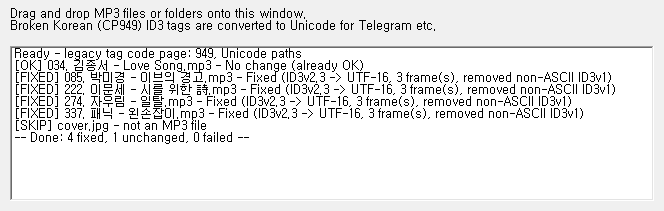
No settings, no dialogs, no preview screens. The log tells you exactly what happened to each file.
Download & run
Save getMp3.exe anywhere and double-click it. There is nothing to install and nothing is written to the registry.
Drop MP3s or folders
Drag files — or whole folders, subfolders included — onto the window or onto the .exe icon in Explorer.
Send them again
Every file gets a [FIXED], [OK], [SKIP] or [FAIL] line. Re-send the fixed files and the captions read correctly.
Careful About Every Byte
getMp3 only rewrites text frames that are provably mis-encoded and copies everything else exactly as it was.
Knows CP949 from Latin-1 from UTF-8
Each text frame labelled ISO-8859-1 is inspected before anything is changed, so genuine Western tags are never mangled.
- Pure ASCII: left alone — it is already correct everywhere.
- Valid UTF-8 in disguise: relabelled as Unicode.
- Valid CP949 byte pairs: decoded with code page 949 and rewritten.
- Anything else: treated as real Latin-1 and kept as is.
Whole Folders in One Drop
Drop a music folder and getMp3 walks every subfolder, converting each .mp3 it finds and reporting the result line by line.
- Safe to repeat: already-fixed files report [OK] and are not touched again.
- Drop on the icon: files dragged onto
getMp3.exein Explorer are processed as soon as the window opens. - Summary line: fixed / unchanged / failed counts after every batch.
Only the Broken Frames Change
The new file is written next to the original first and swapped in only when it is complete. Everything getMp3 does not need to touch is copied byte for byte.
- Audio stream untouched: no re-encoding, no quality loss.
- Album art & other frames kept:
APIC, track numbers and unknown frames are copied as they are. - Dates preserved: created / modified times and file attributes are restored after the rewrite.
| Frame | Before | After |
|---|---|---|
| TIT2 | À̺êÀÇ °æ°í | 이브의 경고 |
| TPE1 | ¹Ú¹Ì°æ | 박미경 |
| TALB | ȯ»óÀÇ °¡¿ä | 환상의 가요 |
| TRCK | 3 | 3 (unchanged) |
| APIC | image/jpeg | copied as is |
| ID3v1 | CP949 text | removed (data kept in v2) |
Legacy ID3v1 Handled Too
The 128-byte ID3v1 tag at the end of a file cannot store Unicode at all. When it holds Korean text, getMp3 moves its values into the ID3v2 tag and removes it so no app can fall back to the garbled copy.
- Missing fields migrated: title, artist, album, year, comment, track and genre fill any gaps in ID3v2.
- ID3v1-only files: get a brand-new Unicode ID3v2.3 tag.
- English-only ID3v1: kept, since it already displays correctly.
Small Tool, One Job, Done Right
Measured on the current build.
15 KB
Single portable .exe
0
Runtime dependencies
4
System DLLs imported
95–11
Windows versions supported
| Item | getMp3 | Re-tagging by hand in a full tag editor |
|---|---|---|
| Effort per file | None — drop and done | Open, retype artist / title / album, save |
| Folders & subfolders | Recursive, one drop | Depends on the editor |
| Encoding detection | ASCII / UTF-8 / CP949 / Latin-1 per frame | Usually a single global code page setting |
| ID3v2.3 output | UTF-16 with BOM (encoding 1) | Editor-specific |
| ID3v2.4 output | UTF-8 (encoding 3) | Editor-specific |
| Korean ID3v1 | Migrated to v2, then removed | Often left behind |
| Audio, album art, unknown frames | Copied byte for byte | Usually preserved |
| File dates & attributes | Preserved | Usually updated to “now” |
| Install size | 14,848 bytes, no installer | Several MB plus installer |
| Oldest supported OS | Windows 95 | Typically Windows 7 or 10 |
Get getMp3
One portable executable. No installer, no telemetry, no network access.
getMp3.exe
Self-contained 32-bit executable. Save it anywhere — desktop, music folder or USB drive — and run it.
Download getMp3.exeBefore you start
- getMp3 rewrites files in place — keep a backup of irreplaceable collections.
- Close players that have the files open; locked files are reported as [FAIL].
- Read-only files are skipped on purpose. Clear the attribute first if you want them fixed.
- Files already sent in a chat keep their old caption. Send the fixed file again.
SHA-256 Integrity Verification
4973a79e2307ed699f9c41aacc09594fe9a5bf1ae490d927e98a6935655fbdfd getMp3.exe
Frequently Asked Questions
My filename is already in Korean. Why does the caption still break?
Because the caption doesn’t come from the filename. Messengers such as Telegram read the artist and title from the ID3 tag inside the MP3. Windows already stores filenames as Unicode, so the filename is fine; the tag is what needs fixing, and that is the only thing getMp3 changes.
Will it change the sound or the file name?
No. The audio frames are copied byte for byte and the file keeps its name, location, timestamps and attributes. Only the ID3 tag at the start of the file is rewritten (and a Korean ID3v1 tag at the end is removed).
Is it safe to run on the same files twice?
Yes. Frames that are already Unicode or plain ASCII are never touched, so a second pass simply reports [OK] No change (already OK) for every file.
Why UTF-16 for ID3v2.3 and UTF-8 for ID3v2.4?
The ID3v2.3 specification only allows ISO-8859-1 or UTF-16, so UTF-16 with a byte-order mark is the most compatible Unicode choice there. ID3v2.4 added UTF-8, which getMp3 uses for v2.4 tags. The tag version itself is not changed.
Does it really run on Windows 95?
The executable is built without the C runtime, imports only functions that exist on Windows 95 (kernel32, user32, gdi32, shell32), avoids SSE instructions and declares subsystem version 4.0. Unicode file APIs are loaded with GetProcAddress only on NT-based Windows. Decoding Korean on 9x requires code page 949, which Korean editions include.
Which files can’t it fix?
ID3v2.2 tags (very old, 3-letter frame IDs), read-only files, files locked by another program and corrupted tags are reported as [FAIL] and left exactly as they were. Compressed or encrypted ID3v2.4 frames are copied without conversion.
Make Your Old Korean MP3s Readable Again
15 KB, one drag, no install. Your music library and your chat history will thank you.